Work Flow
The full work flow is shown below:
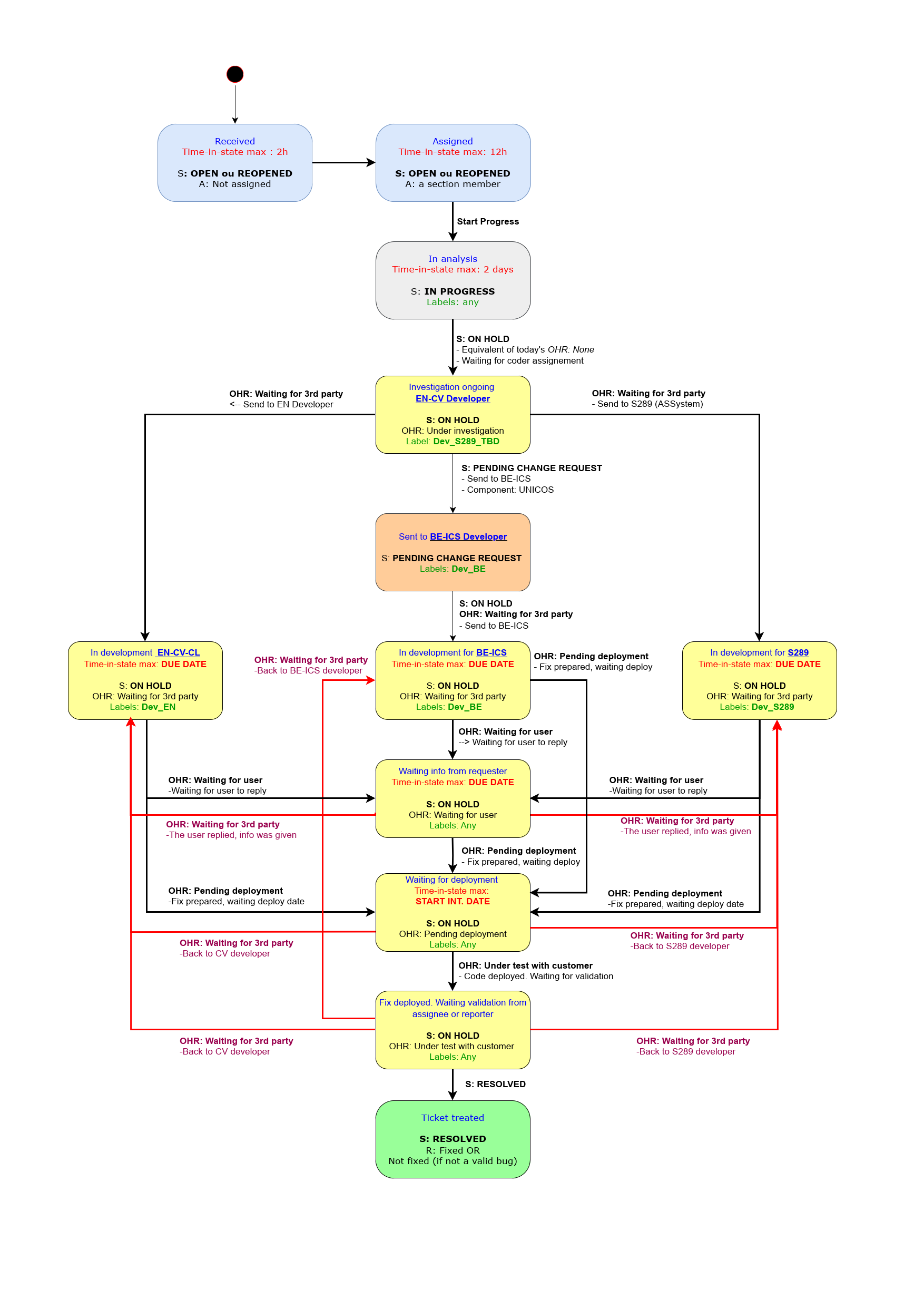
The individual stages are explained in the following:
Assignment
When a ticket is received by the JIRA e-mail handler, every team member is notified.
If no notification e-mail has been received, contact please the JIRA administrator, the e-mail handler may be stopped.
One can then, on a voluntary basis, assign the created ticket. When tickets are left unassigned, the person in standby will assign them to a section member. The assignee will be informed by e-mail.
Please note, that one shall not re-assign a ticket he/she has been assigned without discussing with the new assignee.
Preliminary analysis of the ticket
Once the ticket has been fully understood, this may require several exchanges with the requester, one shall select an entity for the resolution, which can be EN-CV-CL, BE-ICS or the software maintenance contractor S289.
The assignee will then fill out the following JIRA fields, which provide feedback to the requester and facilities searches and dashboard statistics.
- Status select “In Progress" from the "Workflow" menu, to inform the requester.
- Type with a value of the list, for filters.
- Priority with a value of the list, to provide requester with feedback, to inform the developer and for filters. The following priorities can be used:
- Blocker: This problem must be solved immediately
- Critical: This problem must be solved as soon as possible, since it risks becoming blocking
- Medium
- Low
- Component/s, with a value of the list, for filters.
- Labels: Select an existing value, by searching. Start typing to see the existing labels. If no predefined label is appropriate, create one following the same pattern.
- Controls projects: One label for control projects related to UNICOS shall be used. These labels are prefixed with:
- COOL_
- HVAC_
- DP_
- AC_
- WT_
- Assignment: One label for assignment shall be added. These labels are:
- Dev_S289_TBC: The ticket could be given to the contractor
- Dev_S289: The ticket has been given to the contractor and a Work Order has been created. This label replaces the label Dev_S289_TBC
- Dev_BE: The ticket is handled by BE-ICE. The status must be "Pending Change Request"
- Dev_EN: The ticket is handled by EN-CV-CL
- Controls projects: One label for control projects related to UNICOS shall be used. These labels are prefixed with:
- External watchers: with the e-mail of the initial requester.
- Dates: The following date-related fields are used and must be filled out:
- Optional: Intervention Start: Possible start of intervention; this can be the start of a shut-down period
- Optional: Intervention End: Required end of intervention; this can be the end of a shut-down period
- Mandatory: Due Date:
- For PLC software updates or corrections: The date when the software is available by the contractor, for testing by EN-CV-CL
- For other problems: The deadline date of resolution
If the description is not clear, questions can be asked via JIRA comments, the status shall be put to “On Hold”, with the On Hold Reason “Waiting for user”.
Any kind of needed information such as screenshots or attached files should be required to the Reporter by JIRA comments. There shall always be at least one screen shot submitted with a problem report. Analysis cannot start before the user supplies a screen shot.
The preliminary analysis shall be concluded within two hours, as the ticket may be blocking: After at most two hours the ticket must be "Assigned".
The assignee has 12h for initial analysis: After this delay the status must be changed from "Open" to "in Progress" for in-depth analysis.
In-depth analysis
The assignee has two days for in-depth analysis, depending on the priority of the ticket and if required. After two days, the ticket must be "On Hold" with a defined "On Hold" reason.
The "On Hold" reasons used are:
- Under investigation: No other "On Hold" reason is applicable
- Waiting for 3rd party: Waiting for S289, BE-ICE, EN-CV-CL or other. It is possible to create a "Change Request" in parallel, if the ticket requires treatment by BE-ICS
- Waiting for user: Waiting for user confirmation, information or other feedback. If there is no screenshot provided with the initial ticket, this status is used
- Pending Deployment: When the PLC code has been provided by the third party: Waiting for PLC code upload
- Under test with customer
Resolution
- If it can be given to the software maintenance contractor S289, add the value "Dev_S289" to the "Labels" field.
Create a HxGN EAM Work Order and link the JIRA ticket and the Work Order- The Work Order number and the Work Order URL shall be added to the ticket in the fields "EAM WO" and "EAM Link"
- The JIRA case number (CVCTRL-XXXX) shall prefix the title
- The Jira URL of the ticket shall be added to the Work Order comments.
- If it is submitted to the BE-ICS team. Select "Open Change Request" from the menu "Workflow". A link will be automatically created between the original ticket (used for the exchange with the user) and the BE-ICS ticket (used for the exchange between developers). The category shall be set to "UNICOS Support" first.
- The label "Dev_BE" shall be added
Once the ticket has been solved, select the “Resolve Issue” menu and add an explanation if required. If the ticket was linked to a Work Order , the Work Order shall be closed as well.
Notifications
Every week, one will be automatically notified about his unresolved tickets and unresolved Work Orders.
Recommendations
Ticket status
It is recommended to check regularly your tickets to make sure that the status is still valid, that you have been provided the expected missing information and that the developer can still provide the fix and keep their status up-to-date.
The list of active tickets for a given assignee is accessible through the "EN-CV-CL Support" JIRA dashboard.
Plan
It is recommended that you plan carefully the preparation of the resolution of your tickets. The following dates shall be entered:
- Intervention start: the possible date to start the intervention on site - when the plant is available for maintenance
- Intervention end: the required date to finish the intervention on site
- Due date: the required date for the delivery of the software update or correction. The loading of he PLC program date will be after the due date, depending on the plants access constraints and must be defined with the requester who is often the local EN-CV operator. The due date shall be entered in the ticket, it is a very significant piece of information for the developer.
You shall regularly (at least every 2 weeks) check if the plan is still up-to-date and redefine the intervention with the requester if they could not be met anymore. It has to be propagated in the associated Work Order, if any.
The list of ticket with the resolution plan can be easily extracted and prepared for review by applying the "TicketsExtraction" procedure attached below.